
Your Subscription
The Billing page is where you manage your Campflow subscription — view your current plan, update your payment method, and make changes to your account.
To get here, click Billing at the bottom of the sidebar, just below Settings.
Managing Your Subscription
Section titled “Managing Your Subscription”The Billing page adjusts to your current subscription status, so what you see depends on where your account stands. There are four possibilities.
On a Free Trial
Section titled “On a Free Trial”New accounts start on a free trial. While the trial is running, a countdown in the header shows how many days are left — hover over it to see the exact end date. Your subscription starts automatically when the trial ends, so there’s nothing you need to do to keep your account running.
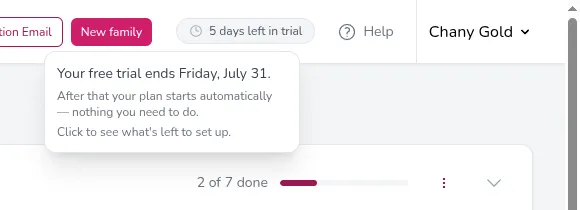
The Billing page shows when your trial ends and a Start Subscription button. Click it to activate your subscription right away — there’s no separate checkout page to visit. Since starting early ends your remaining trial and charges your card immediately, Campflow first asks you to confirm. After you confirm, Campflow takes a moment to activate, then your subscription is live and all features (including broadcasts) are unlocked. A Manage Plan link is also available if you want to review plan options first.
Active
Section titled “Active”When your subscription is active, the page confirms this and shows a Manage subscription button. Clicking it opens a secure billing portal where you can:
- View your current plan and billing cycle
- Update your payment method (credit card, etc.)
- View past invoices and download receipts
- Change or cancel your plan
When you’re done making changes in the portal, click the link to return to Campflow.
Payment Issue
Section titled “Payment Issue”If a subscription payment can’t be processed, the Billing page shows a Payment issue notice in red. Click Update payment method to open the billing portal and enter a working card. Your subscription stays active while you sort it out, but keeping a valid payment method on file avoids an interruption.
Inactive
Section titled “Inactive”If your subscription has expired or been canceled, the page lets you know and shows a Reactivate subscription button. Clicking it opens the billing portal where you can start it up again.
Usage-Based Charges
Section titled “Usage-Based Charges”Some Campflow features — like sending broadcast emails, SMS messages, and voice calls — are billed based on usage. These charges appear on your monthly invoice alongside your subscription fee. You can see the details in the billing portal under your invoices.
Good to Know
Section titled “Good to Know”- Only users with the View Billing permission can access the Billing page. If you don’t see it in the sidebar, ask your administrator to grant you access.
- Some features are only available on certain plans. For example, adding multiple team members and Autopay require a plan above the Lite tier. If you see an “Upgrade required” message when trying to use a feature, visit the Billing page to upgrade.
- Your subscription and billing are handled entirely through a secure portal. Campflow does not store your credit card information.