
Staff Positions
Positions are the roles your staff members hold — things like “Counselor,” “Nurse,” “Head Counselor,” or “Kitchen Staff.” A staff member can hold more than one position. Each position is marked as either Returning (the person stays year after year) or Seasonal (hired fresh each season).
This distinction matters when you open a new season. Active staff in a returning position are carried into the new season automatically, with the same positions, salary, and term. Seasonal staff are not, since you hire them again each season.
Opening the Positions Manager
Section titled “Opening the Positions Manager”- Go to the Staff page from the sidebar.
- Click the Positions button in the top right (next to Add Staff).
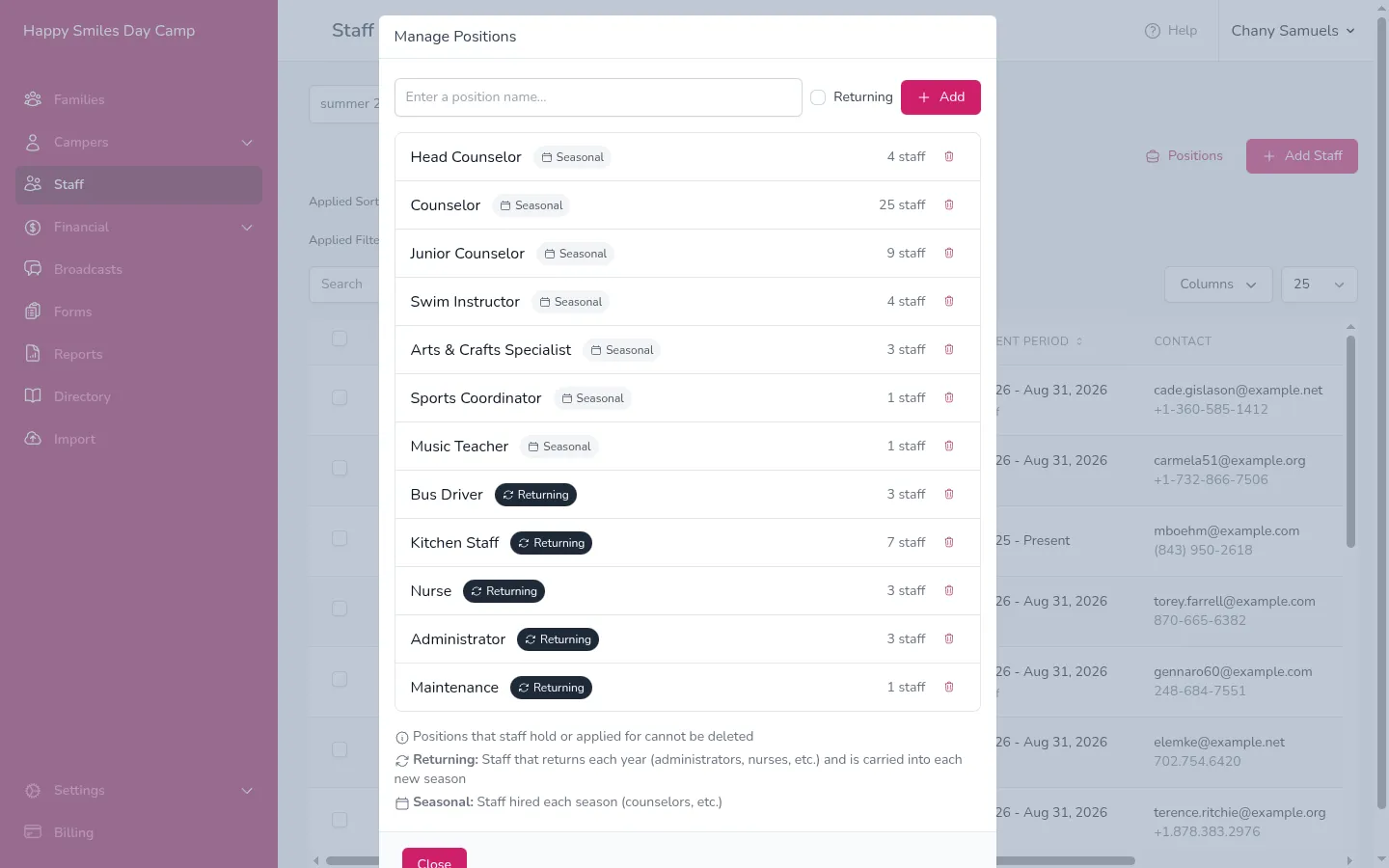
Adding a Position
Section titled “Adding a Position”- Open the Positions manager (see above).
- Type the new position name in the text field at the top (e.g., “Lifeguard”).
- If this position is for staff who return each year, check the Returning checkbox. Leave it unchecked for seasonal staff.
- Click Add.
The new position appears at the bottom of the list and is immediately available when adding or editing staff members.
Returning vs. Seasonal
Section titled “Returning vs. Seasonal”Each position has a badge that shows whether it is Returning or Seasonal:
- Returning — Active staff in this position are carried into each new season automatically when the season is created. Use this for year-round roles like administrators, nurses, maintenance workers, and office staff.
- Seasonal — Staff in this position belong to the season they were hired for. Use this for roles that change each summer, like counselors and activity instructors. See Returning vs. Seasonal Staff for how to bring them back next season.
To change a position between returning and seasonal, click the badge next to the position name. It will toggle between the two.
Deleting a Position
Section titled “Deleting a Position”You can only delete a position that no staff member holds or applied for, in any season. If the position is in use, its trash icon is disabled.
To delete an unused position, click the trash icon next to the position name in the Positions manager.
Default Positions
Section titled “Default Positions”The first time you open the Staff page, Campflow creates a set of default positions to get you started:
- Administrator (Returning)
- Secretary (Returning)
- Camp Mother (Returning)
- Nurse (Returning)
- Head Counselor (Seasonal)
- Counselor (Seasonal)
- Lifeguard (Returning)
- Maintenance (Returning)
You can delete or add to these as needed. They are only a starting point.
Good to Know
Section titled “Good to Know”- Positions are shared across all seasons for your camp — you only need to set them up once.
- The number next to each position in the manager (e.g., “25 staff”) shows how many staff hold it across all seasons.
- Changing a position between Returning and Seasonal affects who is carried over the next time a season is created. Staff already in a season stay where they are.
- The Term field (First Half, Second Half, or Full Season) appears for staff who hold at least one seasonal position, including staff who also hold a returning one.