
Voice Broadcasts
Voice broadcasts place automated phone calls to parents and play a recorded or computer-generated message. They’re useful for urgent announcements or when you want to make sure parents hear your message directly.
Voice calling requires a one-time setup before you can use it. See Setting Up SMS & Voice if you haven’t done that yet.
How to Send a Voice Broadcast
Section titled “How to Send a Voice Broadcast”- Click Broadcasts in the sidebar.
- Click New Broadcast.
- Under Type, select Voice Call.
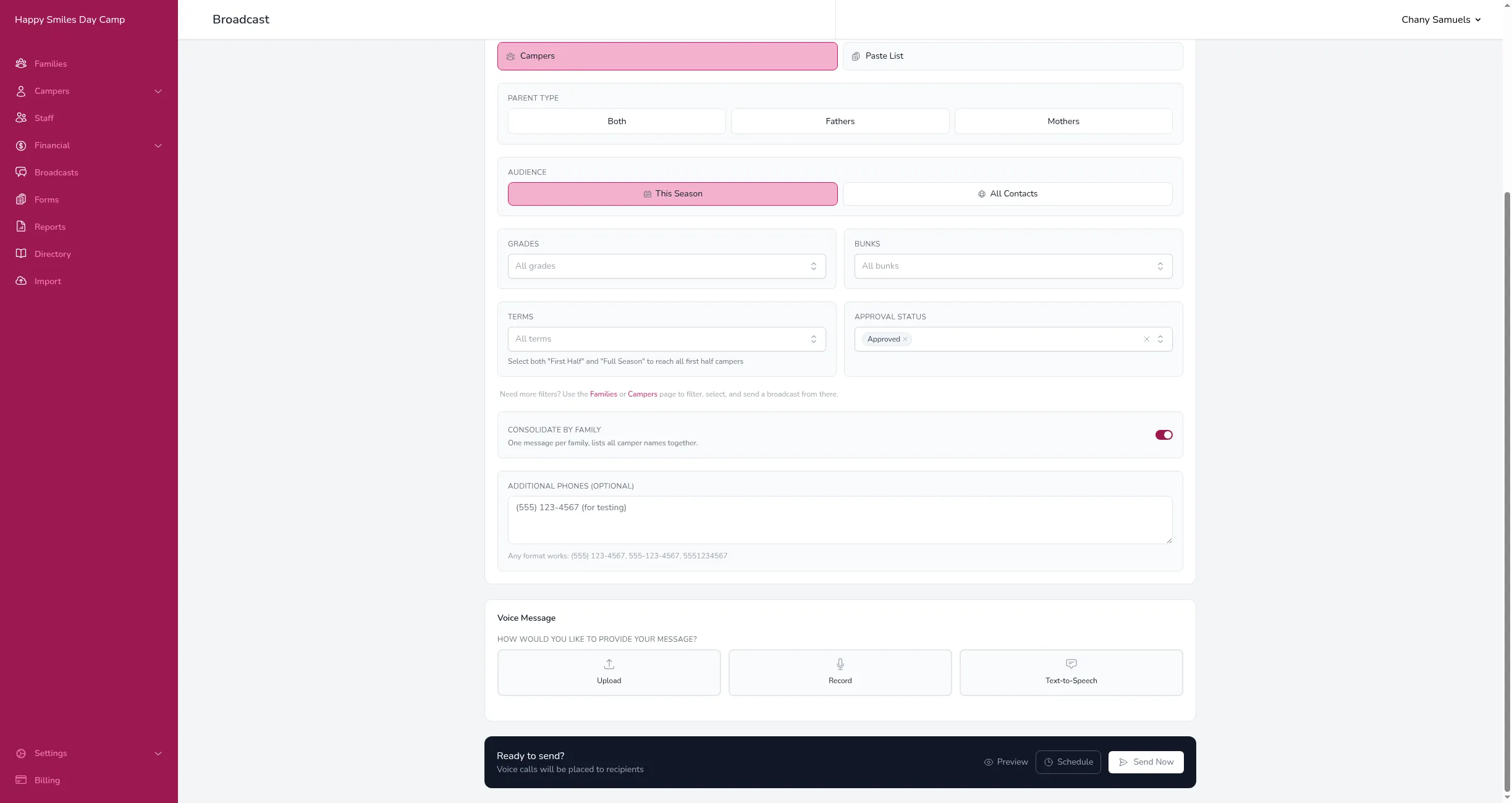
- Choose your recipients.
- Choose how to provide your message (see below).
- Click Send Now.
Message Options
Section titled “Message Options”Under Voice Message, you’ll see three ways to provide your message:
Upload
Section titled “Upload”Upload a pre-recorded audio file from your computer.
- Select Upload.
- Click to browse or drag a file into the upload area.
- Supported formats: MP3 and WAV (up to 12 MB).
- An audio player will appear so you can listen to it before sending.
Record
Section titled “Record”Record a message directly in your browser.
- Select Record.
- Click the record button and speak your message.
- Click stop when you’re done.
- Listen to the playback and re-record if needed.
Text-to-Speech
Section titled “Text-to-Speech”Type your message and a computer voice will read it to recipients.
- Select Text-to-Speech.
- Type your message in the text area.
- Choose a voice: Male or Female.
- The estimated call duration and cost will appear below.
Text-to-Speech supports merge tags, so you can personalize the spoken message with each family’s name, camper details, and more. Uploaded and recorded audio cannot use merge tags since the audio is the same for everyone.
How Voice Calls Work
Section titled “How Voice Calls Work”When you send a voice broadcast:
- We place a phone call to each recipient.
- The message starts playing the instant the call is answered — there’s no pause or dead air at the beginning.
- Short messages are repeated once with a brief pause in between, so the recipient has time to listen.
- The call ends after the message finishes.
Because the message plays as soon as the call connects, it will also play into voicemail if the call isn’t answered live. In that case the call shows as “Completed” in the delivery results. A call that simply rings out without being answered or reaching voicemail shows as “No Answer.”
Call Statuses
Section titled “Call Statuses”After sending, open the broadcast to see the status of each call:
- Completed — The recipient answered and heard the message.
- Busy — The line was busy.
- No Answer — The recipient didn’t pick up.
- Failed — The call couldn’t be placed (e.g., invalid number).
- Canceled — The call was canceled before connecting.
Good to Know
Section titled “Good to Know”- Voice calls cost $0.02 per minute, rounded up to the nearest minute. See Broadcast Costs for details.
- You can click Preview (the eye icon) in the Send bar to place a real test call to yourself or any number you type before sending it to everyone.
- Calls are placed from the phone number assigned to your camp during SMS & Voice setup.