
Pricing & Fees
Campflow uses a layered pricing system. You set default prices for the season, then optionally add extra fees on top. Fees can be mandatory (applied to every camper) or optional (families choose whether to add them during registration).
Default Pricing
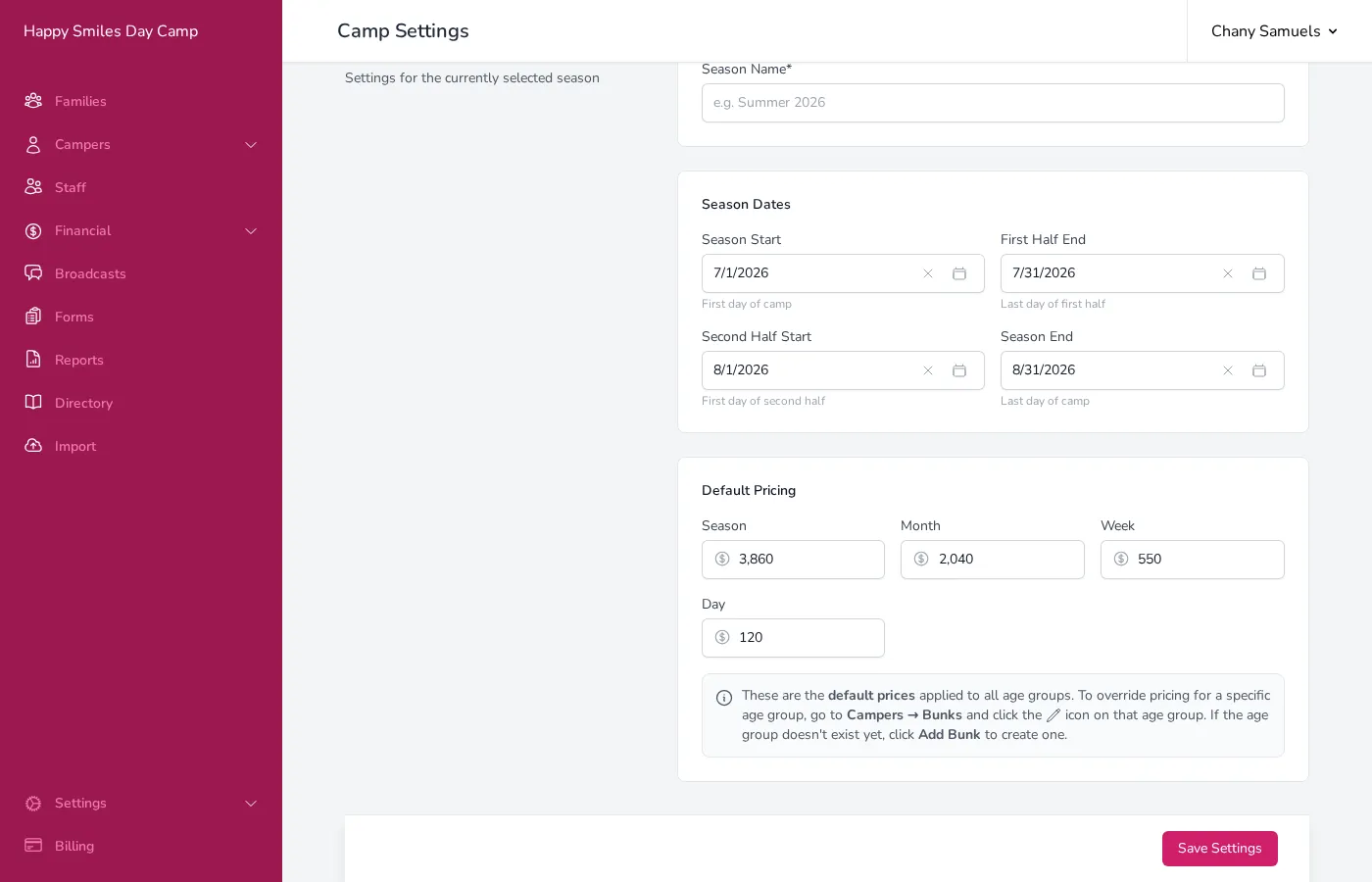
Section titled “Default Pricing”Default pricing is set in the Camp Season section of the Settings page. These prices apply to all campers unless overridden at the bunk level.
- Click Settings in the sidebar.
- Scroll to the Camp Season section.
- Under Default Pricing, enter the price for each term length:
- Season — The full-season price.
- Month — The half-season (one-month) price.
- Week — The weekly rate.
- Day — The daily rate.
- Click Save Settings.
When a camper enrolls, Campflow calculates their tuition based on the term they are attending (full season, first half, second half, etc.) and uses the corresponding price.
Adding Fees
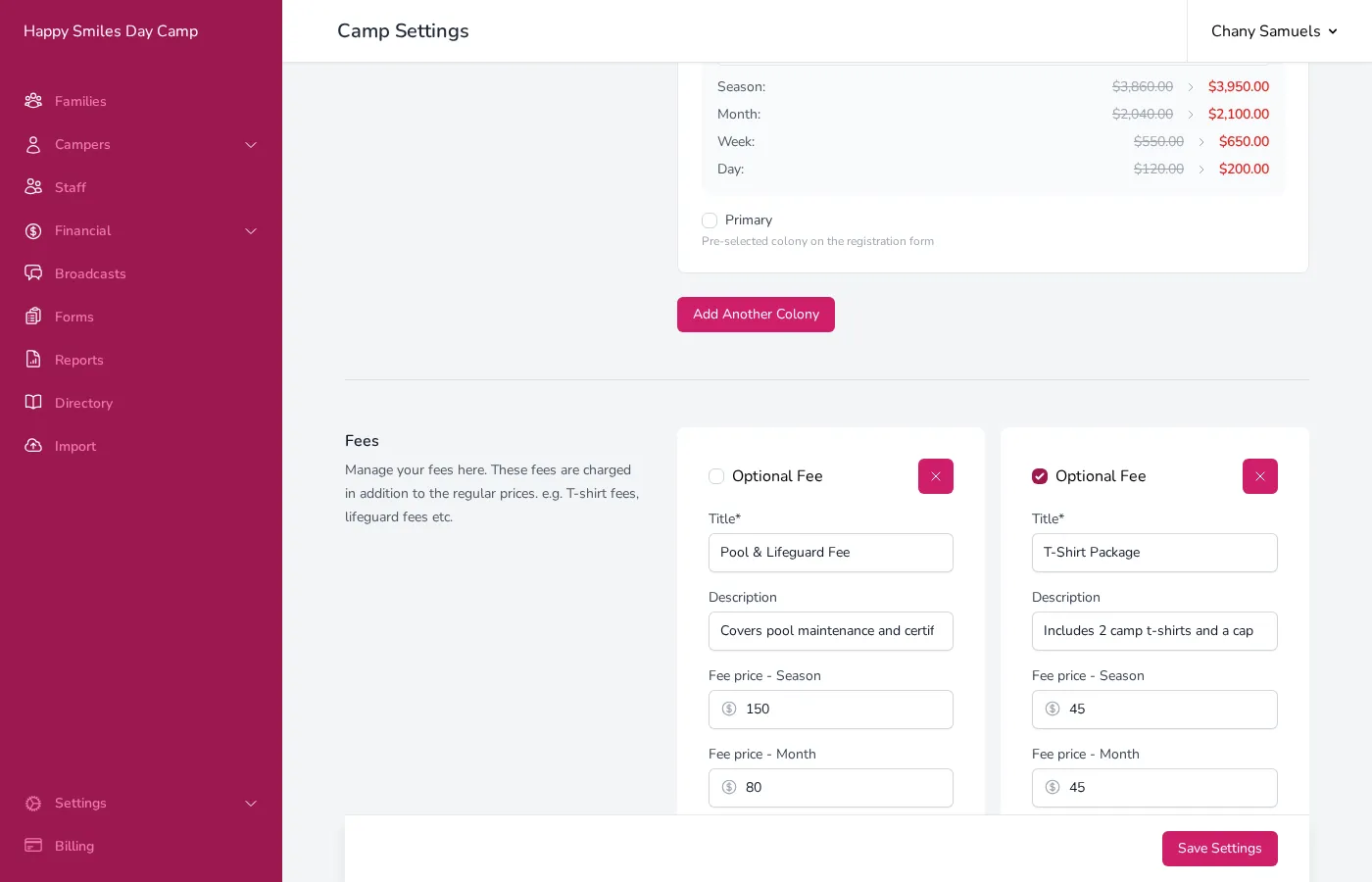
Section titled “Adding Fees”Fees are additional charges on top of tuition. They are managed in the Fees section of the Settings page.
- Scroll to the Fees section on the Settings page.
- Click Add Fee (or Add Another Fee if you already have fees).
- Enter a Title for the fee (e.g., “Pool & Lifeguard Fee” or “T-Shirt Package”).
- Optionally enter a Description to help you remember what the fee covers.
- Enter the fee price for each term length:
- Fee price - Season — Amount charged for full-season campers.
- Fee price - Month — Amount charged for half-season campers.
- Click Save Settings.
Optional vs. Mandatory Fees
Section titled “Optional vs. Mandatory Fees”Each fee has an Optional Fee checkbox:
- Unchecked (mandatory) — The fee is automatically added to every camper’s tuition. Use this for things like lifeguard fees or facility charges that apply to everyone.
- Checked (optional) — The fee appears as a choice on the registration form. Parents can decide whether to add it. Use this for things like t-shirt packages, trip upgrades, or special programs.
Custom Term Pricing
Section titled “Custom Term Pricing”If campers sometimes attend for a custom number of days — for example, a guest who comes for a few days, or a family that enrolls mid-session — you can let Campflow calculate the price automatically based on your daily and weekly rates.
Setting It Up
Section titled “Setting It Up”- Set your rates. In the Default Pricing section (described above), enter prices for at least the Day and Week fields. You can also set a Month rate. Campflow uses all available rates to find the cheapest combination.
- Enable the custom term field. Go to Settings > Registration, scroll to Field Settings, find Custom Term Dates under the Camper section, and turn on the Use checkbox.
Once both steps are done, “Custom” will appear as a term option when you add or edit a camper.
How the Calculation Works
Section titled “How the Calculation Works”When you select Custom as a camper’s term and enter a start and end date, Campflow counts the number of days and finds the cheapest way to cover that duration using your daily, weekly, and monthly rates. For example, if a camper attends for 10 days and your weekly rate is cheaper than 7 daily rates, Campflow will price it as one week plus three days rather than ten individual days. The total will never exceed the full season price.
If a bunk has its own prices set, Campflow uses the bunk price for each rate tier where one exists, and falls back to the default pricing for the rest.
How Pricing Works Together
Section titled “How Pricing Works Together”When a camper enrolls, their total charges are calculated by combining:
- Base tuition — From the default pricing (or bunk-specific pricing if set). For custom terms, this is the auto-calculated amount based on the camper’s dates.
- Mandatory fees — All non-optional fees are added automatically.
- Optional fees — Any optional fees the family selected during registration.
- Colony adjustment — If the family belongs to a colony with a price adjustment, that adjustment is applied to the base tuition.
Good to Know
Section titled “Good to Know”- You can set different prices for different age groups by configuring pricing at the bunk level. Go to Campers, then Bunks, and click the edit icon on a bunk to set custom prices for that group.
- A bunk price of $0 is a real override, not “use the default” — campers in that bunk will be charged $0 for that rate. To have a bunk use your default pricing, leave its price fields blank. Bunk prices also carry over when a new season is created from a previous one, so check them at the start of each season.
- Fees are tied to the current season. Each season has its own set of fees.
- If you delete a fee, it will be removed from the settings but will not retroactively change charges for families who have already been billed for it.
- Negative fee amounts work as discounts. For example, a fee with a season price of -$50 would reduce the camper’s total by $50.
- To create a time-limited discount (like early bird pricing), add a fee with a negative amount. When you want the discount to stop applying to new registrations, delete the fee from your settings. There is no auto-expiration — you will need to remove it manually when the window closes.
- Custom term pricing requires daily and weekly rates to be set in your default pricing. If those fields are blank, the custom term calculation will not have enough information to determine the correct price.