
Payment Methods
Payment methods define how your camp accepts money from families. You can set up credit cards, checks, cash, Zelle, Venmo, and other methods. Each one can be configured with a display name, processing fees, and visibility on parent-facing forms.
Adding a Payment Method
Section titled “Adding a Payment Method”Payment methods are managed in the Accepted Payment Methods section of the Settings page.
- Click Settings in the sidebar.
- Scroll down to the Accepted Payment Methods section.
- Click + Add Payment Method.
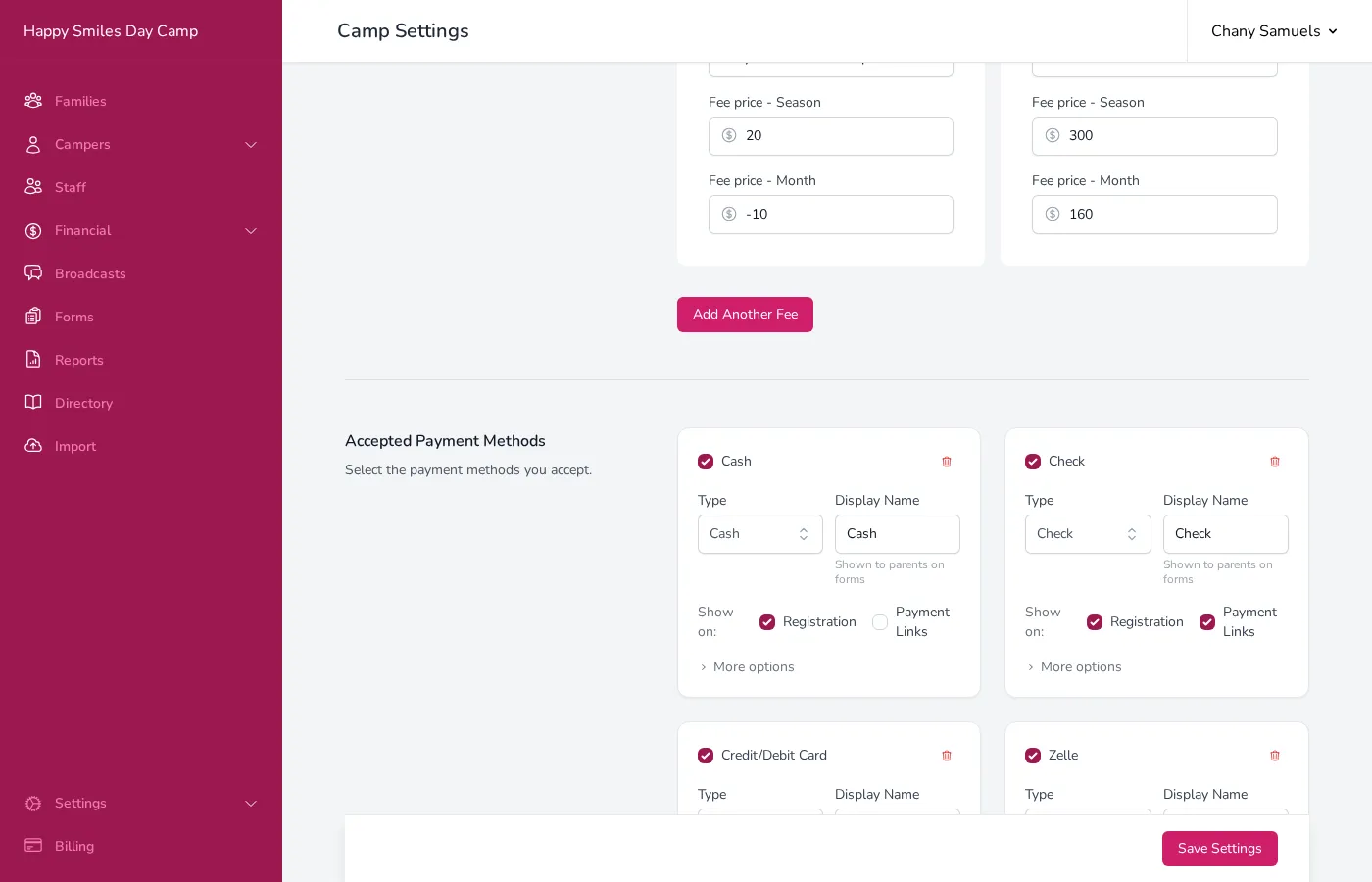
- Choose a Type from the list:
- Cardknox — Credit/debit card processing (powered by Cardknox / Sola).
- Cardknox ACH — Bank account (ACH) processing (powered by Cardknox / Sola).
- Cash — Cash payments recorded manually.
- Check — Check payments recorded manually.
- Credit — Internal credits (admin-only, not shown to parents).
- Zelle/Quickpay — Zelle payments.
- Venmo — Venmo payments.
- Matbia — Matbia card processing.
- Enter a Display Name — the name parents will see on forms (e.g., “Credit Card” or “Pay by Check”).
- Click Save Settings.
Where Payment Methods Appear
Section titled “Where Payment Methods Appear”Each payment method card has a Show on row with two checkboxes that control where parents can see and use it:
- Registration — When checked, the payment method appears on your registration form so parents can select it and pay during registration.
- Payment Links — When checked, the payment method appears on payment links you send to families so parents can select it and make a payment on their own.
Both checkboxes are on by default when you add a new payment method. If you want a method to be admin-only — so only you and your staff can record payments with it — uncheck both. You can also enable one and not the other. For example, you might accept Zelle on payment links but not during registration, or keep cash as admin-only since parents cannot submit cash through a form.
Credit-type methods are always admin-only and never shown to parents.
Processing Fees
Section titled “Processing Fees”If you want to pass processing fees through to parents, you can configure a fee for each payment method. Click More options on the payment method card to expand the settings.
Enter a percentage and/or fixed amount:
- A 2.9% + $0.30 fee on a $100 payment would charge the parent $103.20, so your camp receives the full $100 after the processor takes its cut.
- Campflow shows a preview calculation (e.g., “$100 → $103.20”) so you can verify the math.
For details on how processing fees work, see Processing Fees.
Method-Specific Settings
Section titled “Method-Specific Settings”Different payment types have different configuration options. Click More options on any payment method card to see them.
- Make Check Payable To — The name shown to parents (e.g., your camp’s legal name).
- Mail Check To — The mailing address shown to parents.
- Require check image upload — Parents must upload a photo of the check.
Zelle / Quickpay
Section titled “Zelle / Quickpay”- Your Zelle Email/Phone — Your Zelle contact info, shown to parents so they know where to send payment.
- Require screenshot — Parents must upload a screenshot of their Zelle confirmation.
- Require confirmation # — Parents must enter their Zelle confirmation number.
- Venmo Handle — Your Venmo username (e.g., @YourCamp).
- Venmo Email / Phone — Optional additional contact info.
- Require screenshot / transaction ID — Parents must provide proof of payment.
Cardknox / Sola (Credit Card & ACH)
Section titled “Cardknox / Sola (Credit Card & ACH)”These require credentials from your payment processor (Cardknox / Sola). Your Campflow team can help you set these up if needed.
- Contact Name / Phone — The person families should contact to arrange cash payments.
Additional Options
Section titled “Additional Options”Every payment method also has these settings under More options:
- Default Status — The status assigned to payments made with this method. Options are Accepted (payment confirmed), Pending (waiting to clear), or Promised (family said they will pay).
- Note to Users — Optional instructions shown to parents when they select this method on a form.
How Each Payment Method Works
Section titled “How Each Payment Method Works”Not all payment methods work the same way in Campflow. Understanding the difference helps you decide which methods to enable for parents and which to keep admin-only.
Methods That Process Payments Automatically
Section titled “Methods That Process Payments Automatically”These methods move money directly through Campflow:
- Cardknox / Sola (Credit/Debit Card) — Campflow charges the parent’s card through your payment processor. The transaction happens entirely within Campflow.
- Cardknox / Sola ACH (Bank Transfer) — Campflow initiates a bank transfer from the parent’s account through your payment processor. The transaction happens entirely within Campflow.
When a parent pays with one of these methods — whether on a registration form, a payment link, or through Autopay — the charge is processed instantly (credit card) or initiated immediately (ACH). You do not need to do anything.
Methods Where the Money Moves Outside Campflow
Section titled “Methods Where the Money Moves Outside Campflow”These methods do not process payments through Campflow. The actual money moves between you and the parent outside the system:
- Check — The parent writes a check and mails it or hands it to you.
- Cash — The parent pays you in person.
- Zelle — The parent sends a Zelle transfer to your Zelle account.
- Venmo — The parent sends a Venmo payment to your Venmo account.
- Matbia — The parent pays using their Matbia card.
For these methods, someone needs to tell Campflow that the payment happened. There are two ways this can happen:
You record it yourself (admin-only). You go to the family’s detail page, click New Payment, select the method, and enter the details. This is always available for every payment method.
Parents submit it themselves (opt-in). If you turn on Registration or Payment Links for a check, Zelle, or Venmo method (see Where Payment Methods Appear above), parents can select that method on the form, send you the payment outside of Campflow, and then enter proof — a transaction ID, screenshot, or check image — directly in the form. Campflow records the payment automatically on the family’s account with the default status you configured for that method.
Good to Know
Section titled “Good to Know”- You can temporarily disable a payment method by unchecking its Active checkbox. This hides it everywhere without deleting it.
- Payment methods are shared across all seasons. You set them up once and they apply to every season.
- The Credit type is for internal use only — it is never shown to parents. Use it to record credits, adjustments, or write-offs.
- You can have multiple methods of the same type. For example, you might have two Cardknox / Sola entries if you process payments through more than one account.