
Creating a Season
A season is the foundation of everything in Campflow. It defines when your camp runs, what it costs, and which campers are enrolled. Every family, enrollment, bunk assignment, and payment is tied to a specific season.
When you first set up your camp, a season is created for you automatically. For future years, we create the new season for you and copy over your departments, grades, bunks, pricing, payment plans, and saved reports from the previous season. You can then adjust anything that needs to change. If you’re ready to open registration for next year and don’t see the new season in the season picker yet, message us in the chat and we’ll create it for you right away. Once a season exists, you configure its details on the Settings page.
Configuring Your Season
Section titled “Configuring Your Season”- Click Settings in the sidebar.
- Scroll down to the Camp Season section.
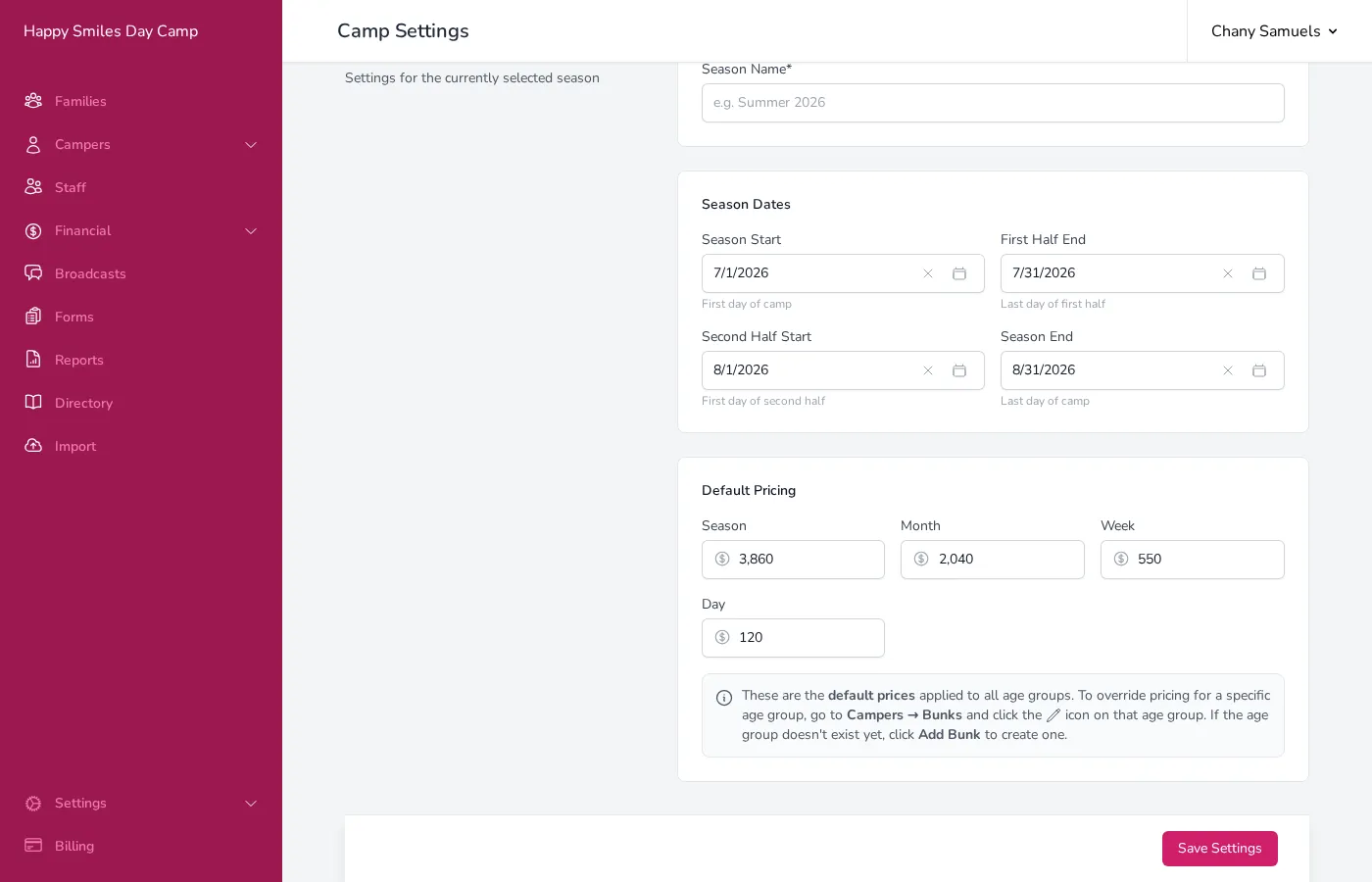
- Enter a Season Name (e.g., “Summer 2026”). This name appears throughout Campflow and on parent-facing forms.
-
Set your Season Dates:
- Season Start — The first day of camp.
- First Half End — The last day of the first half (first month or first session).
- Second Half Start — The first day of the second half.
- Season End — The last day of camp.
Only run one session? Set First Half End, Second Half Start, and Season End all to your last day of camp. If the registration form doesn’t ask parents to choose a term, they only see one full season.
-
Set your Default Pricing. Enter the price for each term length your camp offers:
- Season — Full season price.
- Month — One-month (half-season) price.
- Week — Weekly rate.
- Day — Daily rate.
-
Click Save Settings at the bottom of the page.
These are the default prices applied to all campers. You can override pricing for specific age groups by setting up bunks — see Pricing & Fees for details.
Switching Between Seasons
Section titled “Switching Between Seasons”If you have multiple seasons (for example, last year and this year), you can switch between them using the season picker at the top of the sidebar. The selected season controls which data you see throughout Campflow — families, campers, payments, and reports will all reflect the chosen season.
To learn more about switching seasons, see Switching Seasons.
Good to Know
Section titled “Good to Know”- When a new season is created, Campflow carries over departments, grades, bunks, pricing, payment plans, saved reports, and active staff in returning positions from your previous season. You don’t need to set these up again from scratch — just review and update anything that’s changed.
- Season dates determine how Campflow calculates tuition. Make sure your first half end and second half start dates are accurate, as they define the boundary between the two halves.
- You can update season settings at any time, even after registration is open. Changes to pricing will not retroactively affect families who have already registered — only new enrollments will use the updated prices.
- Setting up next year means creating a new season, not moving this season’s dates forward. Your registrations, links, and prices all stay attached to the season they belong to.
- The season name appears on the registration form, payment receipts, and statements, so choose something clear and recognizable to parents.