
Setting Up SMS & Voice
Before you can send SMS or voice broadcasts, you need to complete a one-time setup process. This involves getting a dedicated phone number for your camp. Email broadcasts do not require any setup.
Choosing a Setup Option
Section titled “Choosing a Setup Option”Go to Settings in the sidebar, then click Communication. You will land on a choose setup path screen with two options side by side:
- Get Started Now — Use Campflow’s pre-approved shared messaging account. Your phone number is ready the same day, with no carrier wait. This is the fastest way to start texting.
- Register Your Own Account — Register your organization directly with the phone carriers. This takes a few business days for approval but gives you your own messaging reputation.
You can start with Get Started Now and upgrade to your own account later without losing your number. Both options are covered below.
Register Your Own Account (Recommended)
Section titled “Register Your Own Account (Recommended)”Register your organization directly with phone carriers. Messages are sent under your own brand with no additional branding. This is the recommended option because your messaging reputation is entirely your own — other camps cannot affect your deliverability. This option requires carrier approval, which typically takes 5-7 business days.
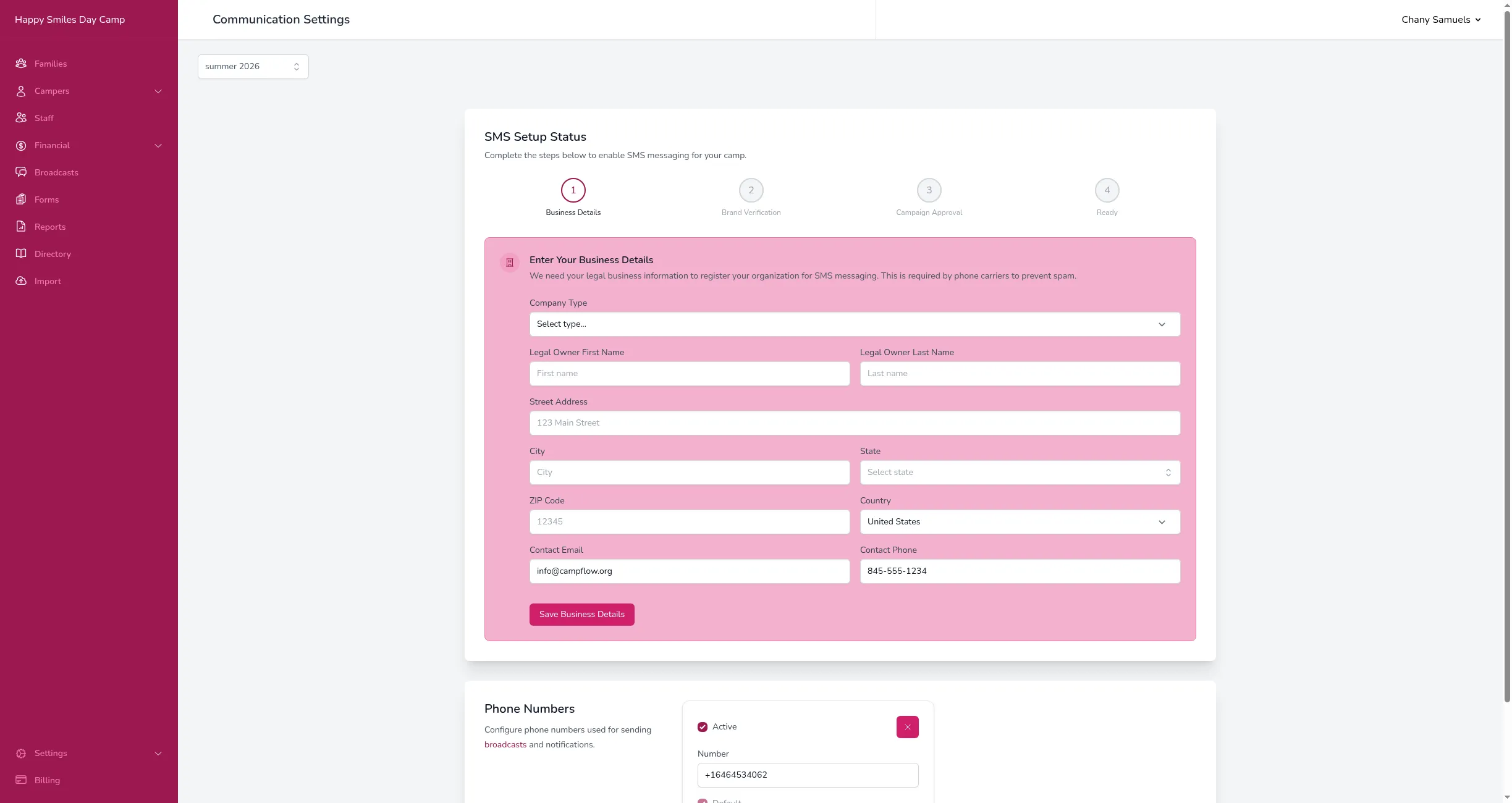
You will see a progress bar with three steps:
Step 1: Enter Your Business Details
Section titled “Step 1: Enter Your Business Details”Fill in your camp’s legal business information:
- Select your Company Type (LLC, Corporation, Non-Profit, etc.).
- Enter your EIN (Employer Identification Number) and, unless you are a sole proprietor, your Legal Company Name. These must match your official IRS records exactly.
- Enter the Legal Owner’s First and Last Name.
- Enter your business Street Address, City, State, ZIP Code, and Country.
- Enter a Contact Email and Contact Phone for your organization.
- Click Submit.
This information is required by phone carriers to verify your organization and prevent spam. If your EIN, legal company name, or address does not match what the carriers have on file, verification can fail — see SMS & Voice Issues for how to fix it. A one-time $49 setup fee will be charged to your payment method on file when your phone number is provisioned after approval.
Step 2: Processing
Section titled “Step 2: Processing”After you submit your business details, two things happen automatically:
- Brand verification — The phone carriers review and verify your organization. This typically takes a few business days.
- Campaign approval — Once your brand is verified, Campflow automatically submits your messaging campaign for carrier approval. This confirms that your organization is authorized to send SMS and voice messages.
You do not need to do anything during this step — the status updates on this page as it progresses. If brand verification fails, you can update your business details and resubmit.
Step 3: Ready
Section titled “Step 3: Ready”Once your campaign is approved, Campflow automatically provisions a dedicated phone number for your camp and charges the setup fee. You are ready to send SMS and voice broadcasts.
Get Started Now (Shared)
Section titled “Get Started Now (Shared)”If you need to start sending messages right away and cannot wait for carrier approval, you can use Campflow’s pre-approved shared messaging account instead. Your phone number is ready in minutes.
- Select Get Started Now.
- Click Add Phone Number.
- A confirmation dialog will appear showing the costs: a one-time $49 setup fee and a $15/month recurring fee.
- Click Yes, add it to proceed. The setup fee will be charged immediately to your payment method on file. If you do not have a payment method saved, you will be prompted to add one.
- Campflow will provision a phone number for your camp, matched to your area code when possible.
Once the number is set up, you are ready to send SMS and voice broadcasts. Keep in mind:
- Messages include “Powered by Campflow” at the end.
- Your number shares a messaging account with other camps. If another camp on the shared account causes spam complaints or carrier issues, it could affect your deliverability too.
- You can switch to your own registered account at any time — see below.
Upgrading to your own registered account is recommended so your messaging reputation stays fully under your control.
Upgrading to Your Own Account
Section titled “Upgrading to Your Own Account”If you started with the shared option and later want to register your own account, you can do so at any time from the Communication Settings page. Select Register Your Own Account and complete the business details form.
Once your brand and campaign are approved, your existing phone number is automatically moved to your own registered account. You keep the same number, there is no extra charge, and no downtime — your phone number continues working throughout the process. Once the upgrade is complete, the “Powered by Campflow” line stops being added to your texts.
After Setup
Section titled “After Setup”Once setup is complete:
- SMS and Voice Call options become available when creating broadcasts.
- Your camp’s phone number appears in the Phone Numbers section on the Communication Settings page.
- Parents who receive your messages can reply to or call back this number.
Good to Know
Section titled “Good to Know”- The setup process only needs to be done once. After that, you can send SMS and voice broadcasts freely.
- Your phone number is dedicated to your camp — no other organization uses it.
- If you need to update your business details after setup (for example, if your organization’s address changes), you can edit them on this page.
- Each phone number costs a one-time $49 setup fee plus $15/month. SMS and voice message costs are charged separately per message. See Broadcast Costs for full pricing.
- If you start with the shared option, you can upgrade to your own registered account at any time without losing your phone number.